

I run this site using WordPress, but a lot of the other sites I develop are created with Joomla.
Recently, I had a lot of trouble getting the thumbnail and meta-description from my sites to show up when I tried to share them on Facebook. Only the site name and the link to the article would be showing when I tried it. This can put a real damper on your Facebook marketing efforts! Turns out this was a Facebook bug but it really made me dive into the whole process.
If you’re not familiar with Facebook you might be wondering why this is so important. Let’s take a look.
When I see an article I like and want to share with my friends, if they have a share button available, I’ll use that, or if necessary I’ll copy the link and paste it in using the link button in the Facebook status field.
So let’s check out one of my favorite sites, gossip site mediatakeout.com. When I see a funny article there, of which there are many, I’ll click on their big-azz Facebook share button they use (not sure why that thing is so dang big).
Here’s what I get when I do that:

Essentially nothing. So when that posts to my wall, that’s all my friends are going to see. There’s no description or thumbnail with this post. It’s pretty boring and people are much less likely to click on the link if they can’t even see what it’s about. I know I usually pass over boring links like this.
So to show a site that does this correctly, let’s look at a link from this very site. When I browse to one of my articles and click the share button, I get this:

Now this looks a lot more interesting. There’s a description of the article, and even a thumbnail. Now that link is a lot more likely to be clicked than the generic one above it.
So again, this is WordPress, how do we get this in Joomla? Well, honestly, sometimes it just works, and other times it doesn’t seem to. I ended up checking out Facebook’s specs on sharing here:
http://wiki.developers.facebook.com/index.php/Facebook_Share/Specifying_Meta_Tags
Actually it looks like the above link is deprecated by Facebook. I couldn’t find any documentation on the Developer site about the Share API anymore. Looks like it’s all about Open Graph now. Check this link folks. New article soon:
http://developers.facebook.com/docs/opengraph
And it turns out there’s three basic items that should be present on the page you want to share.
- Meta Title
- Meta Description
- Image thumbnail source
That last one is the tricky one!
In Joomla, it’s trivially easy to put in the meta description in the ‘Metadata Information’ tab at the bottom right of the Parameters sidebar in your article entry screen.
The title I’ve never had a problem picking up in Facebook from the page title. Normally, Joomla SEO extensions like SH404SEF or Artio JoomSEF can help you with all the metadata, anyway.
But that thumbnail. It’s not a meta tag, it’s a ‘link’ tag. Not so easy to get into the head of your Joomla document.
I spent some time wrangling with it and I came up with a workaround that didn’t involve hacking the core header file.
Essentially we use a bit of php to fill in the name of your image, based on which page you’re on. We do this using the Menu ID assigned to your article. You can find this ID by going to the Menu that your article is assigned to. See this example:

The red part is the ID number we need. We’ll add this number onto the end of our link tag so it pulls the correct image based on which page we’re on.
So now on to the PHP. Joomla has a variable which allows it to get the Menu ID of an item. It’s called, appropriately enough, ‘$itemid’.
So what we’ll do first is open up your template index.php file (it should be found by going to your ftp Home>templates>YOUR_TEMPLATE>index.php.
Or if you’re editing through the Joomla backend, go to Extensions>Template Manager, then click your template,and finally click the ‘Edit HTML’ button. You’ll get a screen with the code of your index.html where you can now edit.
So the first thing we need to do to get started using $itemid is to declare, or initialize the variable (I’m not a true php guru so this may not be the proper term).
To do this we’ll use this code:
<?php $itemid = JRequest::getVar(‘Itemid’); ?>
You have to place this before we actually try to use the $itemid variable. So I put this directly after my first head tag.
Then it’s time to put in the link tag that Facebook will be looking for. The code I use is as such:
<link rel="img_src" href="http://www.example.com/images/stories/fbthumbs/thumbnail<?php echo $itemid; ?>.jpg" />
I put this tag right after the Joomla ‘head calling’ tag that looks like this:
<jdoc:include type="head" />
Check this pic for an example (click for larger view):
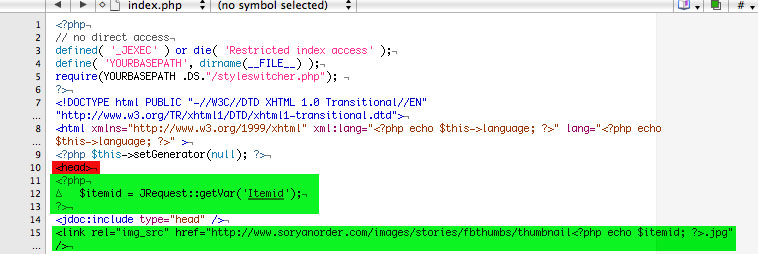
So to break this down, Facebook is going to prefer whichever image is called in this link. Reading the specs from the Facebook link I provided above says that your link has to be an absolute link.
You can see that I have an absolute link there, then I used my ‘images/stories’ folder and created a new folder in there called ‘fbthumbs’, but you can use whatever directory is convenient for you.
Following that as the link continues, you see it says ‘thumbnail’ and then our php code sandwiched right up against it. What’s happening here is that every image I put in this directory will be named ‘thumbnail’ with a Menu ID tacked right on the end. So if my Menu ID was ’44’ as in the image above, my image would be named ‘thumbnail44.jpg’.
The php code is set to “echo” the item ID of whatever page we’re on, so it replaces the php with the item ID, then we wrap it up by adding the ‘.jpg’ on the end and close the tag.
So whenever you make an article, you’ll need to check the Menu ID for it, then name your photo ‘whatever’ and append that Menu ID onto it. As long as it goes into the right directory, Facebook should have no problem finding your preferred thumbnail to use when someone tries to share the item.
And that should do it!
Now, with all that said, this is a workaround, and I hate workarounds. I’d love it if someone came up with a simple extension to handle this.
On my site True Tales of the Soryan Order I use a module called Flexheader 3.
This extension allows you to have a different header for every page based on the Menu ID. It would be great if someone could adapt this header or point out one that does something similar, only for our specific Facebook situation.
Anyway, that’s all for now and please contact me or leave a comment if you know of a simpler solutions. Peace!
UPDATE: I only thought of this later, but I should mention that some people have reported that having any EXIF metadata in your image may cause Facebook to not show your thumbnail. I haven’t observed this behavior myself, but plenty of others have. Here’s one of many threads that discusses how to remove this: http://photo.net/digital-darkroom-forum/00Dy2C.

any tips for making it work in WordPress ( selfhosted godaddy)
it seems to have stopped working last week sometime ,
Many thanks for your helping out !
Hey Brian, as far as I knew Facebook got it working again. Check this thread:
http://forum.developers.facebook.com/viewtopic.php?id=60344&p=1
on the Facebook developer forum, where they admit it was their mistake.
Is Facebook getting ANY of the metadata? Or is it just the thumbnail not showing?
On one of my Joomla sites, it was pulling the thumbnail from an image that had been on my front page two days prior. It may be that Facebook needs to still work through clearing it’s own cache or something. Especially if that page has been shared before.
It’s tough to nail down FB since they keep changing stuff daily…
Hey there !
Thanks for getting back to me , Facebook isnt getting any of the data and looks like it does in the first image above **” heres what i get when i do that ” . It has been like this for over a week .Its very aggravating , i filed a ticket but who knews if they will ever get to it .
Any info would really be appreciated if you hear anything
Thanks !
brianbrianbrian@aol.com
I am having a hard time with this… Facebook will alternate between posting my Meta Description and it wont post the picture on Facebook at all I have labeled the end of my jpg to my Main Articles ID as well as made another one with the menu ID I am really having a hard time here but feel like i am doing it just as you posted and have tried even changing my picture to a more simple one which i wouldnt think i would have to since I have seen Bigger/More Colorful pics on Facebook Links… Any help would be great! Thanks for this Article BTW !
Hi Phil,
I noticed my article was missing a crucial picture in it (gotta maintain these old posts, folks!), so that might have gummed up the works.
I’ll email you my index.php file from one of my Joomla sites tonight so you can see exactly how I have it set up. You probably have it right.
One thing I noticed with the Facebook share.php setup. It seems to cache this stuff for a long time. I have no hard evidence of this, but it seems like if there is a bug or hiccup at Facebook, and then you submit your article and the thumbnail/description does not appear, then you kind of have to wait it out until the cache refreshes, it will always be screwed up until it does that.
Like I said I have zero hard evidence of that but it’s kind of suspicious…
yeah my site just crashed
its giving me a
Database Error: Unable to connect to the database:Could not connect to MySQL
message any ideas?
That sounds like a webhost error. You can try contacting your webhost to see if they’re experiencing issues. There’s also a long thread on that very error over on the official Joomla forums here:
http://forum.joomla.org/viewtopic.php?f=431&t=198257
ok so its prob not my fault :Phew: I have a ton of hours on this LOL
Thank you very much for all of this information you help me out lots as my knowledge of web coding is old and most of this is new to me
yeah Phil – confirmed. Facebook does cache based on URL for a long time. It just now took 3 or 4 days for it to refresh for me. There’s one tip: different URLs are cached separately. So:
this:
http://somesite.com/?1
is cached differently than:
http://somesite.com/?2
So if you need to Share out a link right away and the new version hasn’t been picked up yet, just throw on some random query string on the URL and the share preview will show the latest version of the site.
Good work, Jesse. Now that’s some helpful info. Hopefully this info can help a lot of frustrated people.
I put a facebook share button at the bottom of the page. I have since updated my site, gave my homepage a new page title and description.
However when people ‘share’ my page, the preview that shows what is going to be posted onto their facebook wall shows the OLD information still.
I know my URL was somehow Cached in facebook. Is there a way I can tell facebook to refresh that information, or do I have to wait for the ‘someday’ when facebook refreshes it’s cache?
Thanks!
My site is http://www.joeydavisdesign.com by the way.
Hey Joey,
I don’t know of any way to force the Facebook cache update unfortunately. The good news is that you did everything right, though.
When I clicked your Share button then I got the wrong info as you mentioned. But when I went to my Facebook profile and I attempted to share your link as Jesse (previous commenter) wrote, like so:
http://www.joeydavisdesign.com/?2
(just added a random query string on the end)
then I got the correct info and your thumbnail.
What I wonder is if there’s a way to add that string onto the “Like” button? Failing that I think you’ll just have to wait out their cache refresh. They seems to hold onto it for days if not a week or more. I’ve never been able to narrow down the precise schedule.
So I wish I had a true solution but I don’t (for now).
Nice site by the way!
Hi JG,
Thanks you so much for checking into my problem!! I truely appreciate it! Thanks for the complement on my site too. :)
It’s good to know that it might only take a week for facebook to update/refresh their cache, as long as it won’t cache it forever.
And you’re right about the the random query string. Actually if you just go to http://www.joeydavisdesign.com/index2.html you can hit the share button there and presto, perfect. Index2 is exactly the same as index.html. The only difference is what facebook has cached. I found this earlier:
(I replaced example.com with my site), but I’m thinking this might help facebook find and refresh my site sooner so the icon and description show as they are supposed to.
Thank you again for your input. This has been driving me crazy for a few days.
Hey guys. To force Facebook to refresh its cache for a given link, use their URL Linter:
http://developers.facebook.com/tools/lint/
This will solve all your problems with caching!
Oh, and thanks for the great article! You just solved another of my problems! I’ll adopt your solution.
Nice job, Nélio! I didn’t know about that link so this is definitely a boon to anyone reading this. I’m going to have some fun playing around with this one.
Just tested it. WORKED LIKE A CHARM, people! Time for a new article, y’all…
JG,
I tried to follow your steps but can’t seem to get mine working. Is it possible for you to email me your index.php so I can see exactly how you have it set-up. Thanks!
Hey Lyn,
so are you saying that when you try to share a page then you still get no thumbnail in the Facebook share?
Did you try the techniques mentioned by Jesse and Nelio in the comments?
Make sure you’re not caught in “Facebook Cache Hell” as I outlined in this article:
https://www.hypertransitory.com/blog/2010/10/29/getting-your-facebook-share-out-of-facebook-cache-hell-2/
If that didn’t work hit me up off my contact form and I’ll send you what I did.
Great info on the Facebook URL and Joomla thanks….Implemented the solution on a few of my Joomla sites. Love the ability for the user to select the thumbnail picture upon posting – Great flexibility for social media marketing from Joomla sites.
you’re welcome, John, I’m glad to be of service!
Facebook has went through quite a few updates since I wrote this one but it seems like it still works. whew!
Thanks a lot for helping to fix this. I like Joomla, it’s one of the handiest and easiest CMS. So, of course, I’m interested in all info helping me to upgrade a site built on Joomla. It’s very important to share your site’s content on Facebook. Such a strategy can bring awsome results in SEO and marketing.
Hi All,
Great that somebody found a solution. I see the example of Joey Davis and that is exaclty what I need. Now I am really wondering how he got this
in his head section :)
Sander
Hey Sander, I think my comment plugin ate your code if you typed some in there.
But generally what you need to do to get the code in the head section is to go to your template’s index.php file.
Check under the menu item picture in the article above and I explain how to get to that spot. Just let me know if you have any other questions.
Does it only work if you use the itemid option? Or can I just add the last green section from your screenshot?
Sander, sorry I forgot to get back to this one.
Yeah you’ll need to put that all in there to get my solution to work. If you can’t get it going you can always email me from my contact form and I can help you out.
Thanks so much JG,
I was just thinking of switching away from Joomla. Question from ignorant noobie.
I put the codes into template index file as suggested, but what is it that I need to name the photo in the article? For instance if I have article 44, do I name the photo thumbnail44.jpg and put it in the fbthumbs folder and facebook should be able to find it? What does it mean when you say I need to add a link tag (sorry – this is probably a dumb question).
To maybe complicate matters – when I couldn’t get the thumb thing to work, I did figure out how to add a default image if FB couldn’t find the right image. I used this code: 01 function insert_image_src_rel_in_head() {
02 global $post;
03 if ( !is_singular()) //if it is not a post or a page
04 return;
05 if(!has_post_thumbnail( $post->ID )) { //the post does not have
featured image, use a default image
06 $default_image=”http://example.com/image.jpg”; //replace
this with a default image on your server or an image in your media
library
07 echo ”;
08 }
09 else{
10 $thumbnail_src = wp_get_attachment_image_src(
get_post_thumbnail_id( $post->ID ), ‘medium’ );
11 echo ”;
12 }
13 echo “\n”;
14 }
15 add_action( ‘wp_head’, ‘insert_image_src_rel_in_head’, 5 );
Do I need to delete this from functions.php if I do your fix? I would prefer the right image for the right article rather than a default.
Thanks very much. You make me think I’m pretty close…
Hey Fernette,
No worries, sometimes this stuff gets a little confusing!
Yes you would just name the image “thumbnail44.jpg” and put it in the fbthumbs folder.
If your article is #44, then the code you place in there will simply add that number onto the end of the string and when it goes looking for that image, it will be there in the folder.
You can always email me from my contact form too if you’re having trouble and I can take a look in there for you. Just let me know! Good luck!
Hey JG,
Thanks for trying to help me. I got it! In case this helps other people, I had put a default image for the site when I couldn’t get the specific article’s picture on FB posts. I added JG’s code, but it kept over-riding his hack. I commented it out, then deleted the code, and it still kept showing the default image.
What I needed to do was completely delete the image.jpg or thumbnail.jpg in the folder. Facebook took the one without the itemid first, but if that wasn’t there, then it took the correct or article-specific one.
Also at first I thought it didn’t work when I put the thumbnail into the status or link windows on facebook and didn’t see any thumbnail, but then I remembered seeing somewhere that sometimes FB doesn’t take long URLs and show the thumbnail. When I converted the link via bit.ly, it worked!
Thanks again JG. Really appreciate it!
Thanks guys !
then random number at the end of the URL fix this problem !!
php function rand(1,9999)
[code]
$text=’
‘;
[/code]
thanks again
;)
can’t post some code here?
the code have been deleted
sorry mates ;)
it was only an example of how to do it with simple php function ;)
see you guys !
Sorry, guys! The site did that. I’ve been trying to figure out how to stop that. I think you might be able to use “pre” tags to post the code.
I’ll figure it out and then post the examples above the comment box.
anyway glad it worked out Gandahar!
Did you try the Linter?:
http://developers.facebook.com/tools/lint/
I don’t use Joomla but I heard so much about this. It is very difficult to me to work with joomla because I can’t familiarize the codes.
Thanks for trying to help me. I got it! In case this helps other people, I had put a default image for the site when I couldn’t get the specific article’s picture on FB posts. I added JG’s code, but it kept over-riding his hack. I commented it out, then deleted the code, and it still kept showing the default image.
Ah, that’s good news! I’m glad you got it sorted out, man. It can be extremely frustrating when it’s not working.